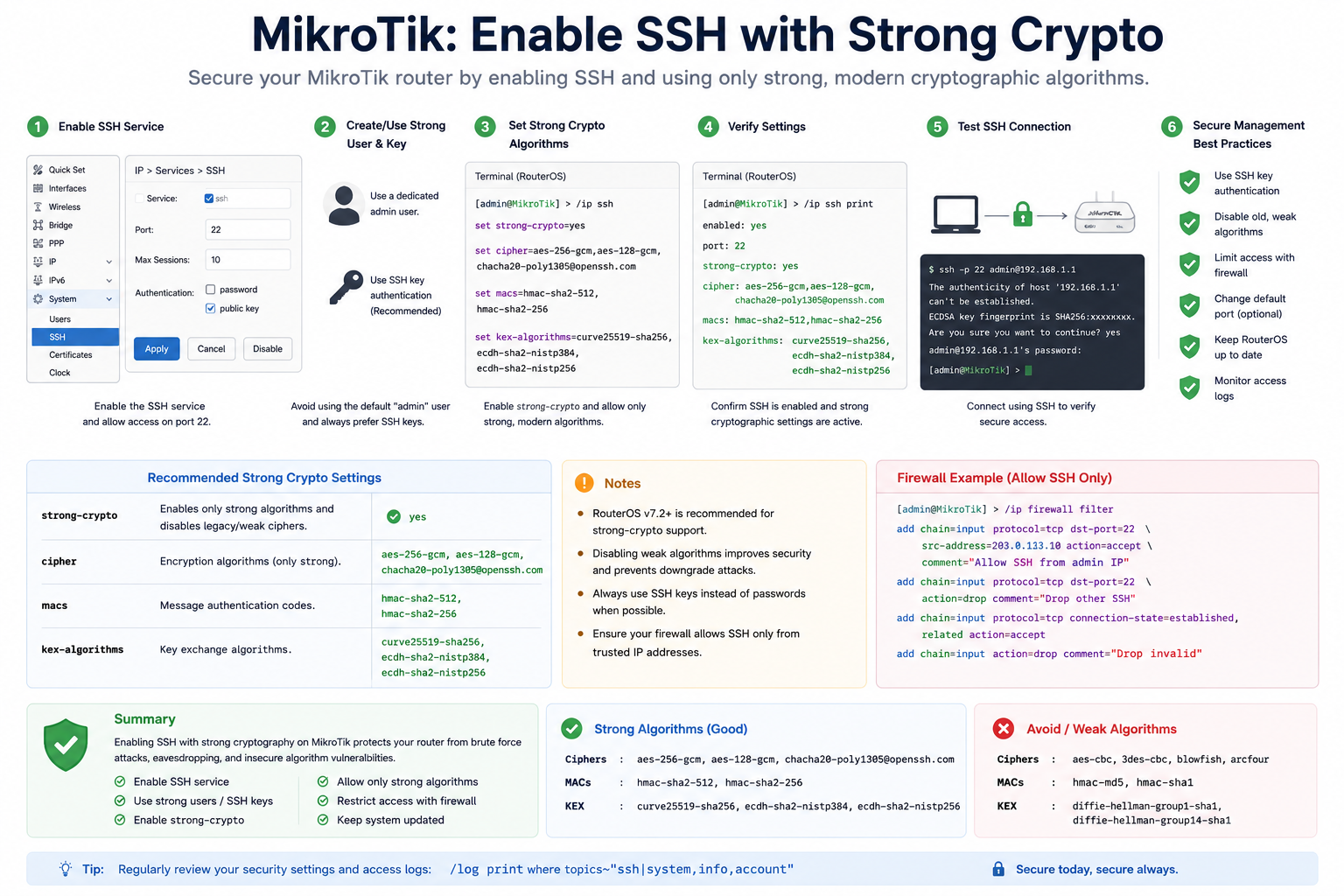
MikroTik: Enable SSH with Strong Crypto
Enabling SSH with strong cryptography on a MikroTik router helps secure remote management access and protects the device from weak encryption attacks, brute force attempts, and unauthorized access.
What is SSH?
SSH (Secure Shell) is a secure protocol used to remotely access and manage network devices through an encrypted connection.
Compared to Telnet, SSH provides:
- Encrypted communication
- Better authentication security
- Protection against packet sniffing
- Safer remote administration
How to Enable SSH with Strong Crypto
- Enable SSH Service
Activate the SSH service on the MikroTik router. - Use Strong Authentication
Create a dedicated administrator account and use strong passwords or SSH keys. - Enable Strong Cryptography
Configure RouterOS to allow only modern and secure cryptographic algorithms. - Verify SSH Configuration
Confirm that SSH is enabled and strong crypto settings are active. - Test SSH Access
Connect using an SSH client to ensure the configuration works properly. - Restrict Access with Firewall Rules
Allow SSH access only from trusted IP addresses.
Example MikroTik Commands
# Enable SSH service
/ip service enable ssh

# Enable strong cryptography
/ip ssh set strong-crypto=yes

# View SSH settings
/ip ssh print
Recommended Strong Crypto Settings
Strong cryptography enables secure algorithms such as:
- AES-256-GCM
- AES-128-GCM
- ChaCha20-Poly1305
- HMAC-SHA2-256
- Curve25519 key exchange
These algorithms provide stronger protection against modern cyber attacks.
Example Firewall Rule
/ip firewall filter
add chain=input protocol=tcp dst-port=22 src-address=192.168.1.10 action=accept
add chain=input protocol=tcp dst-port=22 action=drop
This configuration allows SSH access only from a trusted IP address.
Benefits of Strong SSH Security
- Protects against brute force attacks
- Prevents weak encryption vulnerabilities
- Secures remote router management
- Reduces unauthorized access risks
- Improves overall network security
Best Practices
- Disable unused services such as Telnet or FTP
- Use SSH keys instead of passwords when possible
- Change the default SSH port if needed
- Keep RouterOS updated regularly
- Monitor login and access logs