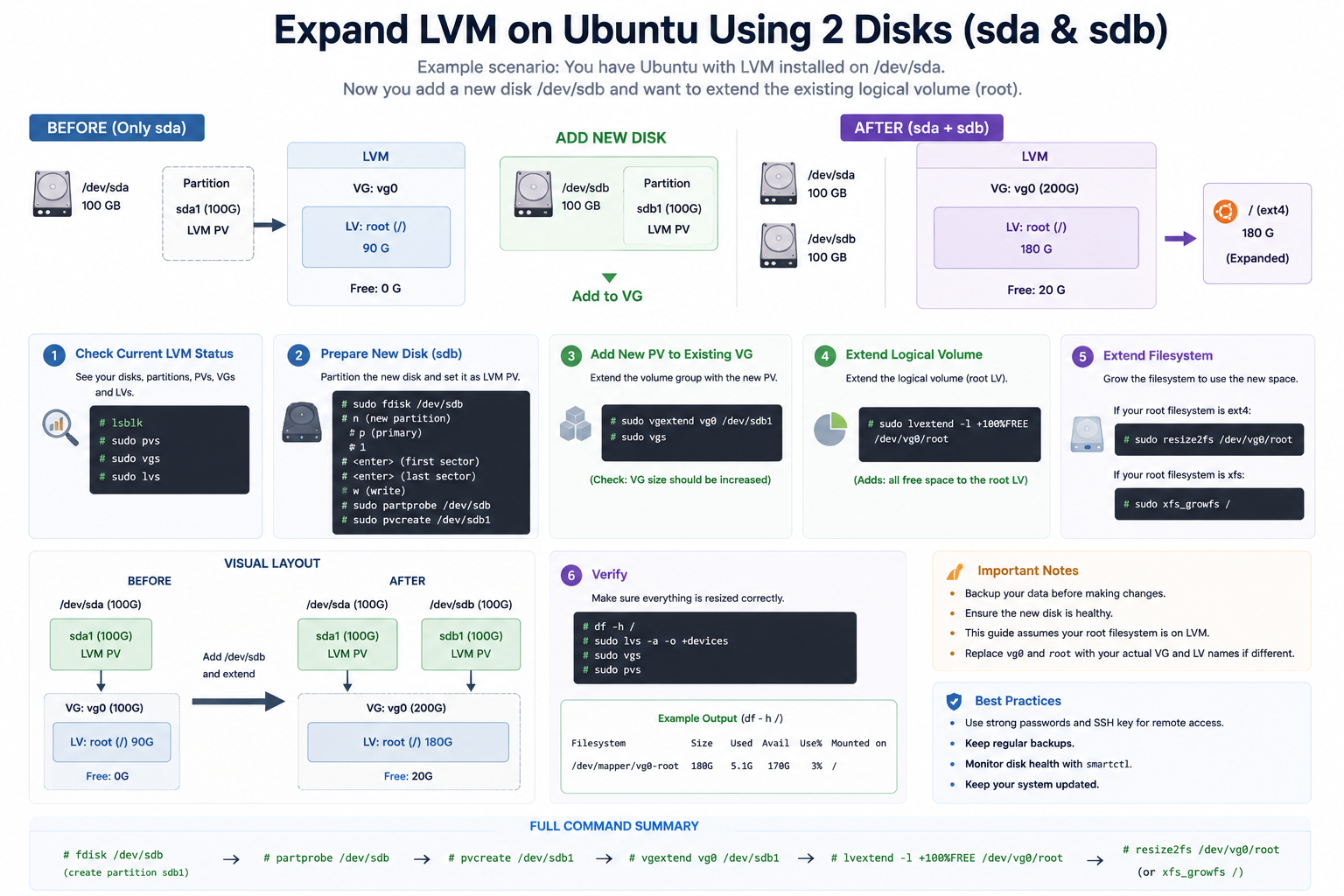
Expand LVM on Ubuntu Using 2 Disks (sda & sdb)
Logical Volume Manager (LVM) on Ubuntu allows administrators to expand storage dynamically without reinstalling the operating system.
In this scenario, the system already uses /dev/sda, and a second disk /dev/sdb is added to increase storage capacity.
What is LVM?
LVM (Logical Volume Manager) is a storage management system in Linux that provides flexible disk management.
LVM consists of:
- PV (Physical Volume) → Physical disks or partitions
- VG (Volume Group) → Combined storage pool
- LV (Logical Volume) → Virtual partitions used by the filesystem
Expansion Process Overview
Before Expansion
/dev/sdacontains the existing LVM storage.- The root partition is nearly full.
After Expansion
/dev/sdbis added into the existing Volume Group.- The Logical Volume size increases.
- The filesystem is expanded to use the new space.
Step-by-Step Process
1. Check Current LVM Status
lsblk
sudo pvs
sudo vgs
sudo lvs
These commands display disks, physical volumes, volume groups, and logical volumes.
2. Prepare the New Disk (/dev/sdb)
Create a new partition and configure it for LVM.
sudo fdisk /dev/sdbInside fdisk:
- Create a new partition
- Set partition type to
8e(Linux LVM) - Save changes
Then refresh partition information:
sudo partprobe /dev/sdb3. Create a Physical Volume
sudo pvcreate /dev/sdb1This converts the new partition into an LVM Physical Volume.
4. Extend the Volume Group
sudo vgextend vg0 /dev/sdb1This adds /dev/sdb1 into the existing Volume Group vg0.
5. Extend the Logical Volume
sudo lvextend -l +100%FREE /dev/vg0/rootThis allocates all available free space to the root logical volume.
6. Resize the Filesystem
For EXT4 filesystem:
sudo resize2fs /dev/vg0/rootFor XFS filesystem:
sudo xfs_growfs /This step allows the operating system to use the newly expanded storage.
Verify the Expansion
df -h
sudo vgs
sudo lvs
These commands confirm the new storage size.
Benefits of Using LVM
- Easy disk expansion
- Flexible storage management
- Minimal downtime
- Better scalability
- Simplified server administration
Important Notes
- Always back up important data before modifying partitions.
- Ensure the new disk is healthy and detected properly.
- Verify filesystem type before resizing.
- Use correct VG and LV names based on your environment.