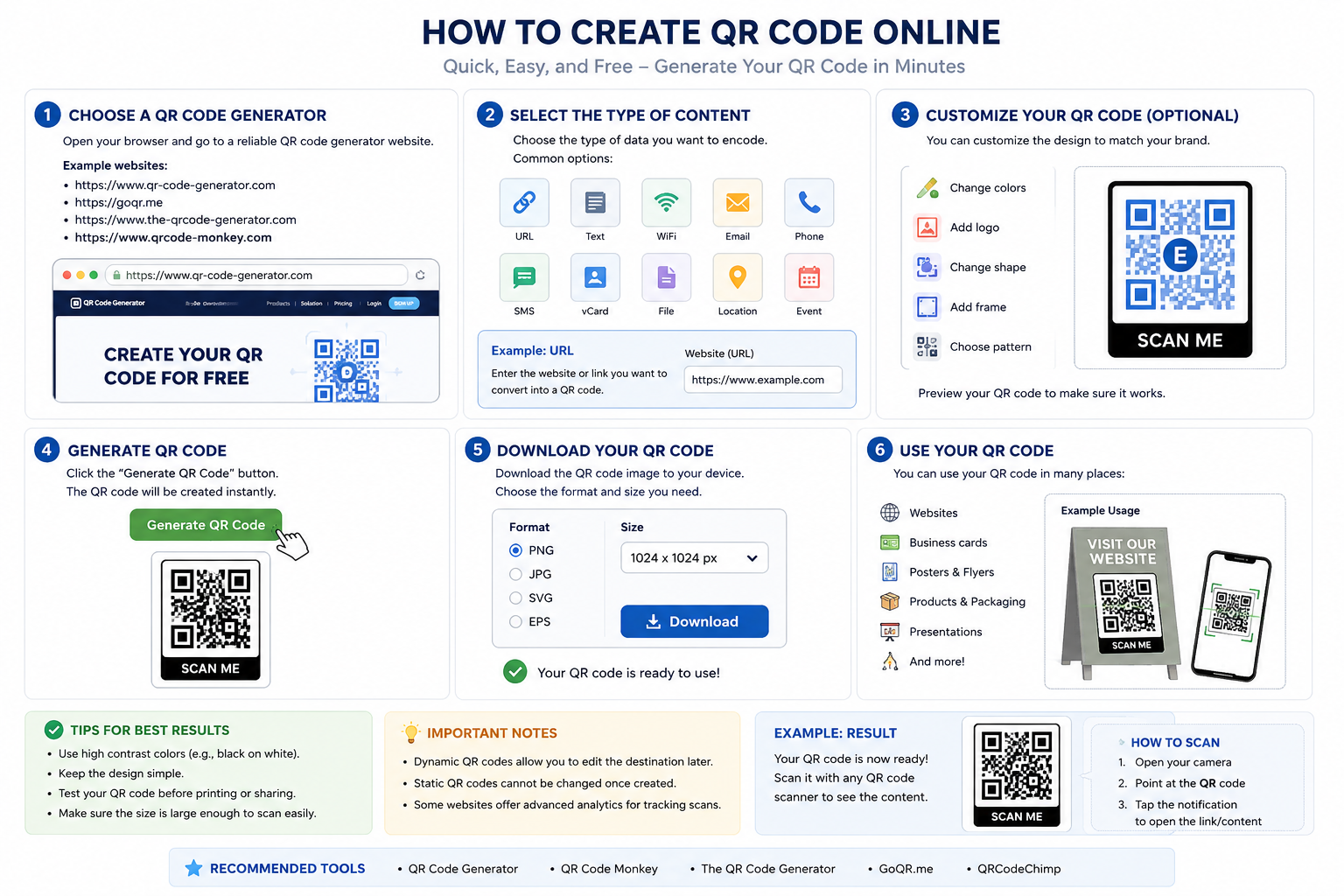
How to Create QR Code Online
Overview
A QR code (Quick Response code) is a type of barcode that can store information such as:
- Website URLs
- Text
- Contact information
- WiFi credentials
- Email addresses
- Phone numbers
Users can scan the QR code using a smartphone camera or QR scanner application.
Step-by-Step Guide
1. Open a QR Code Generator Website
Use your browser and visit a QR code generator website.
Examples:
These websites allow you to create QR codes for free.
2. Choose the QR Code Type
Most QR generator websites provide several options:
- URL / Website
- Text
- WiFi
- Phone Number
- SMS
- vCard / Contact
- Location
Example:
If you want to create a QR code for a website:
https://example.compaste the URL into the input field.
3. Customize the QR Code (Optional)
Many websites allow customization such as:
- Changing colors
- Adding logos
- Changing QR patterns
- Adding frames or labels
Example:
SCAN METhis makes the QR code more attractive and easier to recognize.
4. Generate the QR Code
Click:
Generate QR CodeThe website will instantly create the QR code image.
5. Download the QR Code
Choose your preferred format:
- PNG
- JPG
- SVG
- EPS
PNG is recommended for general use because it is widely supported.
Example resolution:
1024 × 1024 pxHigher resolution is better for printing.
6. Test the QR Code
Before sharing or printing:
- Open your smartphone camera
- Scan the QR code
- Make sure it opens the correct content
This helps avoid broken links or incorrect data.
Example Using JavaScript
The code in your screenshot generates a QR code dynamically using an online API.
Example:
function view_qrcode(id) {
    var path =
    'https://zxing.org/w/chart?cht=qr&chs=350x350&chl=' + id;

    document.getElementById("qrcode").src = path;
    document.getElementById("code").innerHTML = id;

    $("#modal3").modal('show');
}