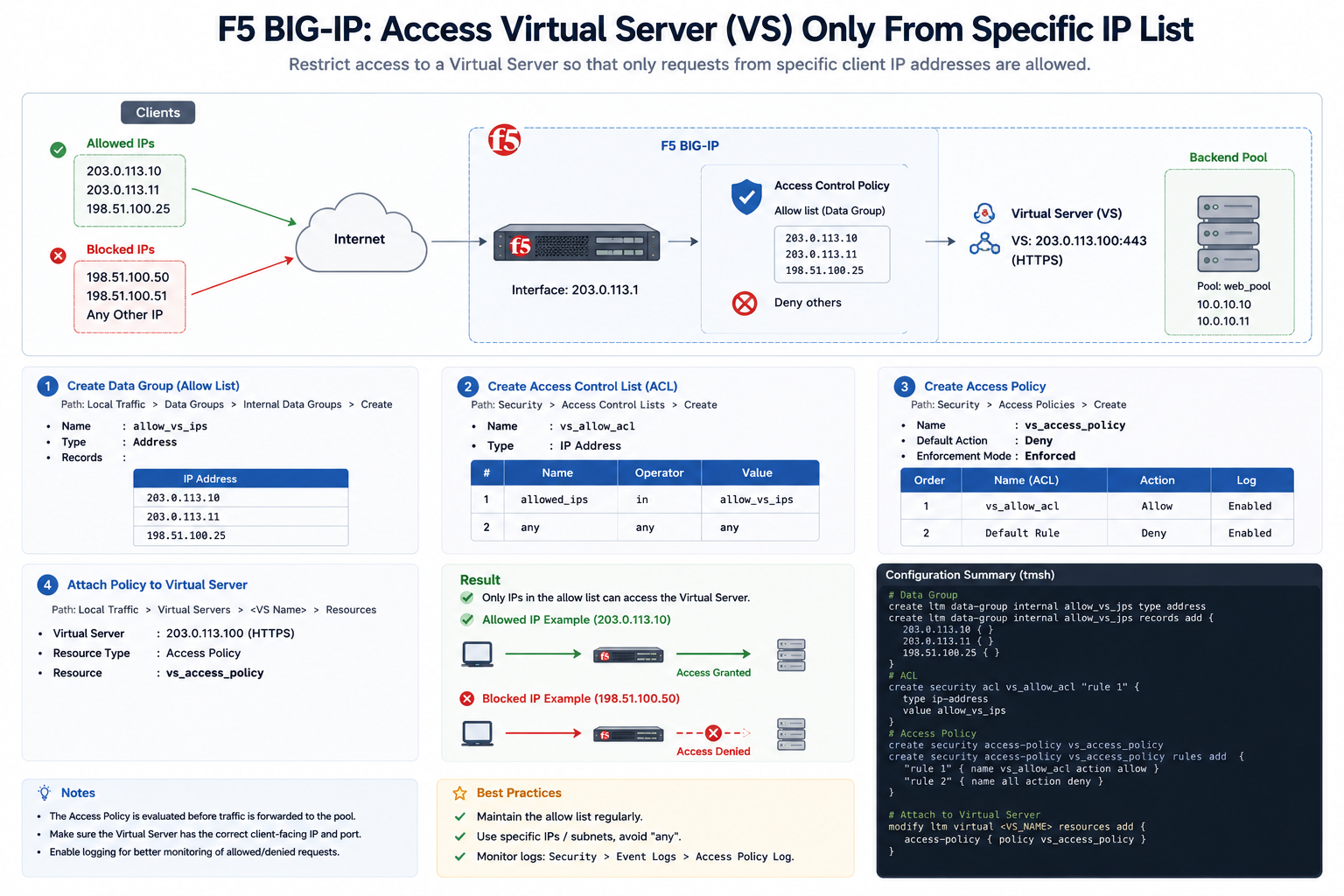
F5 Networks BIG-IP: Restrict Virtual Server (VS) Access to Specific IP Addresses
In F5 Networks BIG-IP, administrators can secure a Virtual Server (VS) by allowing access only from approved IP addresses or subnets.
This configuration improves security by blocking unauthorized traffic before it reaches backend servers.
What is a Virtual Server (VS)?
A Virtual Server in F5 BIG-IP is a listener that accepts client traffic and forwards requests to backend application servers.
Example:
203.0.113.100:443This Virtual Server handles HTTPS traffic on port 443.
How Access Restriction Works
- Client Sends Request
Users attempt to connect to the Virtual Server. - F5 Checks Source IP Address
BIG-IP compares the client IP against the allowed IP list. - Allow or Deny Decision
- Allowed IP → Access granted
- Unauthorized IP → Access denied
- Traffic Forwarding
Approved traffic is forwarded to the backend server pool.
Example Allowed IP List
203.0.113.10
203.0.113.11
198.51.100.25
Only these IP addresses can access the Virtual Server.
Common Configuration Methods
1. Data Group (Allow List)
A Data Group stores approved IP addresses or subnets.
2. Access Control List (ACL)
ACL rules determine which IPs are allowed or denied.
3. iRule
An iRule can dynamically inspect and block unauthorized IP addresses.
Example iRule Configuration
when CLIENT_ACCEPTED {
    if { [IP::client_addr] equals 203.0.113.10 } {
        return
    } elseif { [IP::client_addr] equals 203.0.113.11 } {
        return
    } else {
        reject
    }
}
This iRule allows only specific client IP addresses and rejects all others.
Example tmsh Configuration
create ltm data-group internal allow_vs_ips type ipAdd allowed IP records into the Data Group and apply the policy to the Virtual Server.
Benefits of IP Restriction
- Improves application security
- Prevents unauthorized access
- Reduces attack surface
- Helps mitigate brute force attempts
- Protects sensitive internal applications
Best Practices
- Use specific IP addresses or subnets only
- Regularly review and update allow lists
- Enable logging for denied requests
- Combine with WAF and firewall protections
- Use HTTPS with strong TLS encryption
Monitoring and Verification
Administrators can monitor:
- Allowed connections
- Denied requests
- Security logs
- Access policy events
Useful monitoring locations:
- Local Traffic Logs
- Security Event Logs
- Access Policy Logs