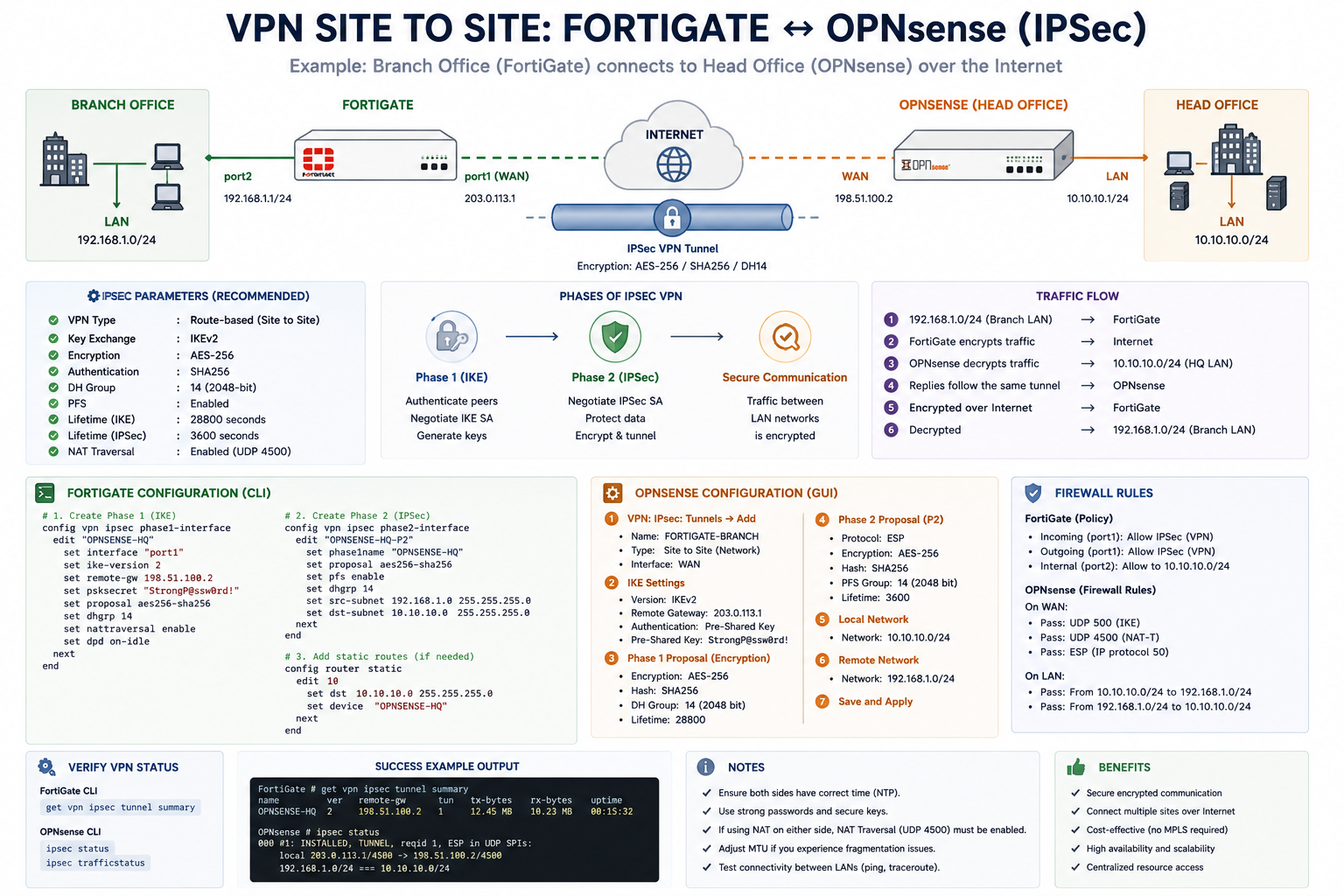
VPN Site-to-Site: Fortinet FortiGate ↔ OPNsense
A Site-to-Site VPN creates a secure encrypted connection between two different networks over the internet.
In this setup, a Fortinet FortiGate firewall connects securely to an OPNsense firewall using IPSec VPN technology.
This configuration allows devices in different offices to communicate securely as if they were on the same local network.
Example Network Scenario
Branch Office
- LAN Network:
192.168.1.0/24 - Device: FortiGate
Head Office
- LAN Network:
10.10.10.0/24 - Device: OPNsense
Connection
- Secure IPSec tunnel over the internet
How Site-to-Site VPN Works
- VPN Tunnel Initialization
Both firewalls establish communication using public IP addresses. - Phase 1 (IKE Authentication)
The devices authenticate each other using:- Pre-shared key (PSK)
- Encryption algorithms
- Authentication methods
- Phase 2 (IPSec Tunnel)
An encrypted tunnel is created for LAN-to-LAN traffic. - Secure Traffic Transmission
Data between both offices is encrypted before passing through the internet. - Automatic Decryption
The receiving firewall decrypts the traffic and forwards it to the local network.
Recommended IPSec Settings
| Setting | Recommended Value |
|---|---|
| VPN Type | Site-to-Site |
| IKE Version | IKEv2 |
| Encryption | AES-256 |
| Authentication | SHA256 |
| DH Group | 14 |
| PFS | Enabled |
| NAT Traversal | Enabled |
Example FortiGate CLI Configuration
config vpn ipsec phase1-interface
    edit "OPNSENSE-VPN"
        set interface "wan1"
        set ike-version 2
        set remote-gw 198.51.100.2
        set psksecret "StrongPassword"
    next
end
Example OPNsense Configuration
IPSec Settings
- VPN Type: Site-to-Site
- Authentication: Pre-Shared Key
- Encryption: AES-256
- Hash Algorithm: SHA256
Local Network
10.10.10.0/24Remote Network
192.168.1.0/24Firewall Rules
Both firewalls must allow IPSec-related traffic:
Required Ports
- UDP 500 (IKE)
- UDP 4500 (NAT-T)
- ESP Protocol (IP Protocol 50)
Benefits of Site-to-Site VPN
- Secure communication between offices
- Encrypted data transmission
- Centralized resource access
- Cost-effective alternative to leased lines
- Scalable for multiple branches
Best Practices
- Use strong pre-shared keys
- Keep firmware updated regularly
- Restrict firewall access where possible
- Enable logging and monitoring
- Synchronize system time using NTP
Verification Commands
FortiGate
get vpn ipsec tunnel summaryOPNsense
ipsec statusThese commands help verify whether the VPN tunnel is active.